KTC may stay mostly under the radar as a white-label display maker for companies such as ViewSonic, yet it also turns out some of the better-priced gaming monitors you can buy. We’ve already highlighted their excellent OLED options. The new M27P6 stands out even more, since it brings a 27-inch 4K 160Hz Mini LED IPS panel—an approach that works well for both gaming and content work. It’s also easy on the wallet, currently listed for £340 on Amazon UK, $450 on Amazon USA, and $409 from the KTC Store.
The M27P6 isn’t a stripped-down model. It includes a standout mix of features like a broad selection of ports, a KVM switch, a 65W USB-C input, and a dual mode setting that drops the resolution to raise the refresh rate. In that 1080p 320Hz configuration, it’s especially suited to high-tempo esports sessions.
Visually, the M27P6 uses an attractive two-tone black-and-white look that brings to mind the Alienware AW3225QF. Still, it misses some of Dell’s more premium flourishes, partly because of its plastic build and the slightly chunkier bezels around the panel. Even so, at this price, that trade-off feels reasonable. The monitor also feels sturdier than you’d expect for its budget category, and setup is made simpler with a tool-free installation thanks to a clip-in stand and base.

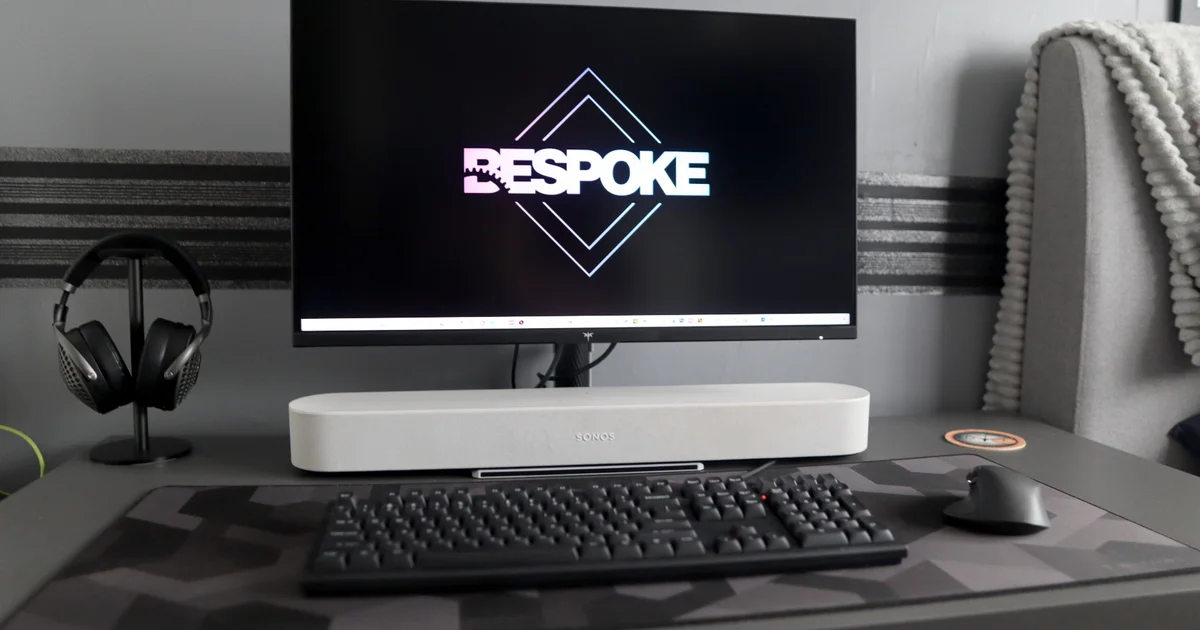
You also get solid positioning controls, including swivel, tilt, and a generous height range. It can even rotate into portrait orientation, which makes it handy as an extra display in your setup—or for vertical workflows when you need them. The flat base occupies less desk space than many typical V-shaped feet, and it gives you a surface to put items on. For example, I went with a Sonos Beam soundbar to keep the audio setup more compact.
For its relatively low price, the M27P6’s port selection is surprisingly capable and can outclass models that cost more. You get two HDMI 2.1 inputs and one DP 1.4, plus a USB-C port that supports video output and up to 65W power delivery. With the HDMI 2.1 connections, you can plug in a PS5, PS5 Pro, Switch 2, or Xbox Series X and play at up to 4K 120Hz. The USB-C port makes laptop charging straightforward via a single cable. There are also two USB-A ports fed through a USB-B link from your PC, plus a headphone jack. On top of that, this KTC model supports KVM functionality, letting you route peripherals to two separate devices through the monitor and switch as needed.
The OSD is where the M27P6 doesn’t quite keep up. It looks fairly basic compared with the more detailed systems you’ll find on models from Asus, Gigabyte, and MSI. Even though you still have access to common settings like brightness, contrast, and HDR modes, some of the higher-end options are missing. The joystick used to move through the menus can also be more awkward than you’d expect, demanding more precision than anticipated for the input you want. Certain screens—such as those for brightness or HDR mode—require confirmation every time, which can quickly get annoying.
Even though the OSD suggests this is a budget-leaning display, the panel itself tells a different story. The 27-inch 4K Fast IPS panel may not grab you immediately, but the 1152-zone Mini LED backlight with Full Array Local Dimming completely changes the experience. KTC says it can reach a peak HDR brightness of 1400 nits, which is a big step up from typical IPS displays. My own testing matched its reported peak SDR brightness of 400 nits, and HDR support includes VESA DisplayHDR 1400 and DisplayHDR 600. That said, it doesn’t offer support for features like Dolby Vision or HDR10+, despite the fact that only a small number of PC games use either HDR format.
The panel doesn’t carry certification for AMD FreeSync or Nvidia G-Sync VRR, which is common on many competitors. Even so, you can still enable these features manually using graphics cards from any brand. When I tested, I didn’t notice issues like stuttering or tearing once those options were turned on, which makes me suspect KTC may have chosen not to spend on the expensive certification steps.
In my testing, turning on local dimming helped in every scenario. Without it, my colorimeter produced relatively unremarkable results, placing the monitor among the brighter-than-usual Fast IPS options. With local dimming enabled, contrast improved and blacks looked deeper, giving you a stronger overall dynamic range. I also didn’t see the typical blooming artifacts when it was on, largely because there are many dimming zones available.
With a 4K resolution, you get sharp detail and excellent clarity—especially when the Mini LED backlight is doing its part. The smooth 160Hz refresh rate also helps keep motion fluid in games like Cyberpunk 2077 and Forza Horizon 5, as well as for everyday productivity. Still, to really benefit from the combination of resolution and refresh rate, you’ll want a fairly powerful PC, because 4K is more demanding than 1440p—four times the pixel count of 1080p.
As a dual-mode display, you can alternatively switch to 1080p while running at 320Hz, which delivers even crisper motion for competitive titles like Counter-Strike 2. That kind of responsiveness can be useful for players who focus on competitive play. The downside is a noticeable drop in detail, so the overall image quality suffers.
Using my colorimeter with Full Array Local Dimming enabled produced generally dependable results. While peak…
Brightness didn’t
It didn’t necessarily climb past the 628 nits I measured with FALD disabled, yet the contrast ratio jumped from 1110:1 to 3490:1. That improvement translates into a stronger dynamic range, while the black level gets noticeably farther down (0.57 versus 0.10). To be fair, these results may not match the consistency you’ll see in similarly priced 1440p OLED models, but it’s still among the very best options you can find on an IPS panel at any price.
The M27P6 also stands out for its reliable color performance: my colorimeter shows 100 percent sRGB coverage, which keeps everyday tones looking true to life for both gaming and work. On top of that, the panel hits 97 percent DCI-P3 and 93 percent Adobe RGB, making it a practical choice for tasks that demand more accurate color and creative workflows—especially when paired with the strong overall performance described elsewhere.
Mini LED has quickly become the dark horse of the monitor market. While OLED has grabbed most of the spotlight, it has left older VA, IPS, and TN options to play a supporting role—options many of us were happy with for years. Mini LED, though, strikes a tempting middle path, delivering impressive dynamic range, richer depth, and sharp peak brightness, without the burn-in worries that often stay in the back of your mind with OLED.
Considering the price being asked, I’m mostly impressed by the KTC M27P6. It’s also one of the more packed-with-features panels you’ll find around this budget, producing crisp 4K visuals with strong contrast and deep blacks. It further earns points for excellent color accuracy, solid port availability, and a stand that’s easy to adjust. What keeps it from perfection is mostly in the finer points—an OSD that feels a bit awkward to use and a stand that seems slightly flimsy. Still, if you can live with those compromises, it’s a very capable gaming monitor for the money.