Getting through all the initial setup screens in Football Manager 26 took a fair amount of time, just so I could finally step onto the touchline for my first match. That kind of process will feel familiar to anyone who’s been playing Football Manager for years. Every save starts with a bit of preparation time—often stretching into many minutes, hours, and sometimes even days—spent on press conferences, budget debates, tactical reviews, and overhauling the scouting setup before the squad returns to pre-season training and the first kickoff approaches. In FM26, though, Sports Interactive’s bold decision to introduce a brand-new engine and a refreshed user interface pushes this routine even further. There’s a great deal here to get to grips with—or, more accurately, to re-learn if you’ve worked with the series before. A lot of the foundation stays the same, but it’s now arranged in a new structure, rather like coming back home only to find your furniture has been moved around in every room—maybe even a few items have been reupholstered while you were away. On top of that, certain features are genuinely new, even if they’re initially confusing in a “wait, what?” kind of way, yet potentially brilliant once you understand them.
The changes kick off immediately, right from the opening screen. Your manager now has a more refined character creator, and while the visuals are clearly improved, what stands out is the shift toward a more RPG-like way of shaping your manager’s abilities. Instead of hard numbers, many traits are described in plain language—so your attacking coaching might be “average,” “good,” “very good,” “outstanding,” and similar gradations. Personally, I’m not a huge fan of that approach. If there’s still an underlying number, then it feels like we should just be able to see it—especially since you can access the other ratings anyway and you’ll almost certainly end up using Google to work out what “very good” means in numerical terms. (The same concern applies to those long-hidden attributes that feed into details like a player’s personality description—in my view, if we can be shown a number for things such as Teamwork or Determination, it’s worth asking why Professionalism or Ambition are kept out of sight.)
More interesting, though, is how these outcomes are decided. You choose three coaching styles from a set of nine (Attacking, Defensive, Developer, Energetic, Entertainer, Pragmatist, Specialist, Systems Builder, and Tactician), and you also pick three mental styles from six options (Driven, Disciplined, Resilient, Convincing, Inspirational, Accomplished). Those selections then determine how your ratings come out for particular coaching areas—attacking coaching, set-piece coaching, man management, and more. It’s reminiscent of the “background” systems you see in classic RPGs: you lock in a few character-defining elements that end up influencing the actual numbers behind how effective you are in the game. If you like insisting that FM really is an RPG, you’ll likely enjoy this. It also introduces built-in tendencies—things like “plays attacking football” or “plays entertaining football”—which then feed into in-game dialogue, including how the press talks about you.
After that came the standard burst of mini-tutorials, delivered through the “Portal” (more on that shortly). For the most part, they behave like you’d expect: they guide you through a series of slide-style pages covering key meeting points. Still, this is where I ran into my first real challenge with FM26’s new UI.

If you haven’t come across it before, here’s the quick version: FM26 now uses a Windows-like system where clicking specific “tiles” inside your not-Inbox opens a smaller window that sits on top of your current view within the UI. In practice, it behaves like a pop-up. You can leave the original page in the background while you expand items you might see there, but only in limited detail—ideal for a quick check at a moderate level of depth, then you close it when you’re done. The problem is that these windows don’t include a “back” option. For example, I ended up in a team dynamics induction pop-up that featured multiple pages of (rather long) information about how the system works. Once I reached a page showing tiles inside that same window for a few of my important squad leaders, I clicked one to dig further into Bruno Fernandes’ leadership potential—so I could decide who should be captain. What happened next? I was taken straight to Bruno’s page inside the window, but there was no way to return to the induction screen I’d been looking at. So I had to close the entire window, go back to the not-email in my not-Inbox that originally started the induction, and then manually work my way back to the point where I’d left off.
As for the Portal, it essentially serves as your Inbox—and that’s a good thing. The Inbox itself worked smoothly, and while it’s true that real-world football management rarely looks like it’s being handled from a laptop and Gmail, the game’s pseudo-email setup still makes sense. It uses a short list of tasks on the left, paired with a larger panel on the right where you can inspect a task or notification in more detail. For a game like FM, it’s a practical system because you’re essentially working through a steady chain of in-tray messages and assignments, while also being able to explore the wider UI when you want to investigate something more thoroughly. The main change is the introduction of those tiles (or cards—I can never remember which label Sports Interactive prefers) inside the expanded email view. Instead of a single block of text in a traditional email layout, you’re now met with several separate boxes containing the relevant information. I’d call this a small improvement, though it’s still early in the game—down the line it might become a noticeable time-saver, or it could end up feeling more awkward than simply having a paragraph of text with a few useful links tucked into it.
The biggest shift, however—arguably even more important than the UI changes—arrives on the pitch. Or more precisely: underneath the pitch, in the locker room, and on the whiteboard. It’s all about tactics!
After a few hours, this part starts to stand out in a big way.
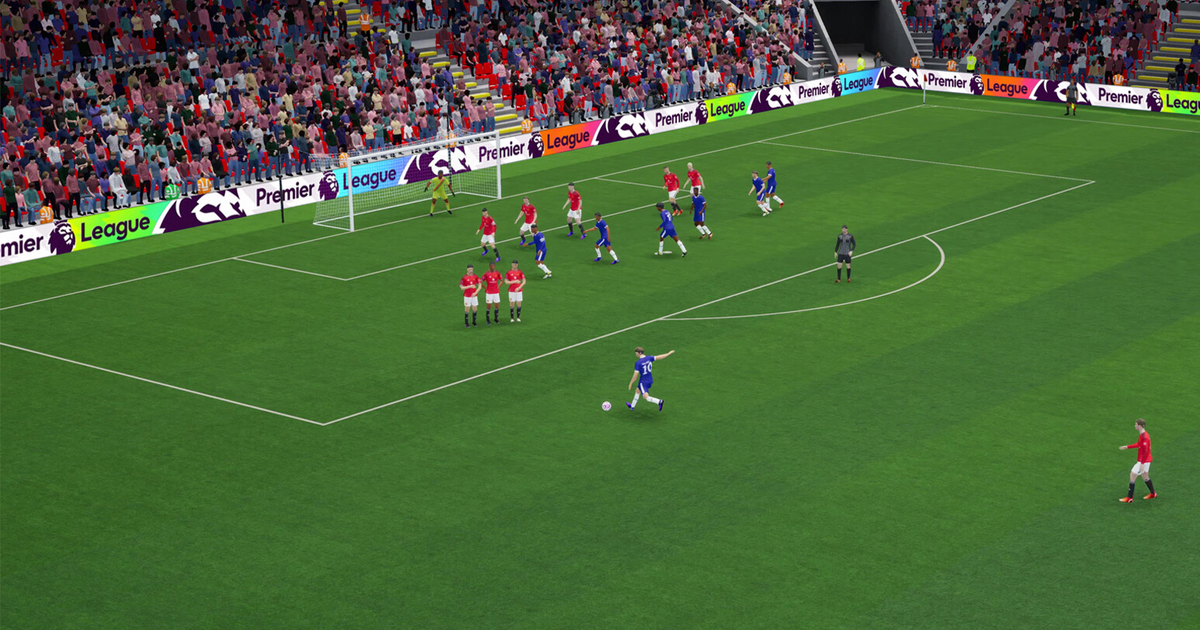
The most noticeable shift happens right inside the matches. FM26’s games look far more refined and lifelike in motion than anything we’ve seen before. There are plenty of upgrades that…
bring a stack of new animations and a smoother way they connect with one another—an improvement you can spot immediately. Sure, you’ll still recognize many familiar moves; if you’ve poured hours into FM, you’ll find FM-style motion patterns all over the place. But at its core, the gameplay now feels much closer to real football. It’s also great to see the 2D visuals running between key moments, not just during highlights. Long live the 2D match viewer.
These additions are impressive, yet anyone who’s spent time around the sport’s most overused clichés knows the real work is done in the locker room and on the training ground—and the tactical side delivers just as much on first inspection. Training seems to operate in much the same way, though I didn’t have much time to dig into every corner, but tactics have clearly gone through the biggest redesign since roles and responsibilities were introduced more than a decade ago. Now you get a split between tactics used when your team has the ball and tactics used when it doesn’t. You even have two tactics screens showing separate setups, plus a single view that combines both, along with a brand-new tactical visualization tool. In practice, it genuinely feels like a breakthrough.
“It’s something we wanted to achieve—something we’ve been thinking about—for a very, very long time,” Jack Joyce, senior product owner at Sports Interactive overseeing the tactics and match engine systems, told me during an interview at the studio. He explained that the team has been working toward this for more than four years. “Essentially, it comes from the idea that we could mirror certain tactical systems we see in real life, using the tools we already had.”
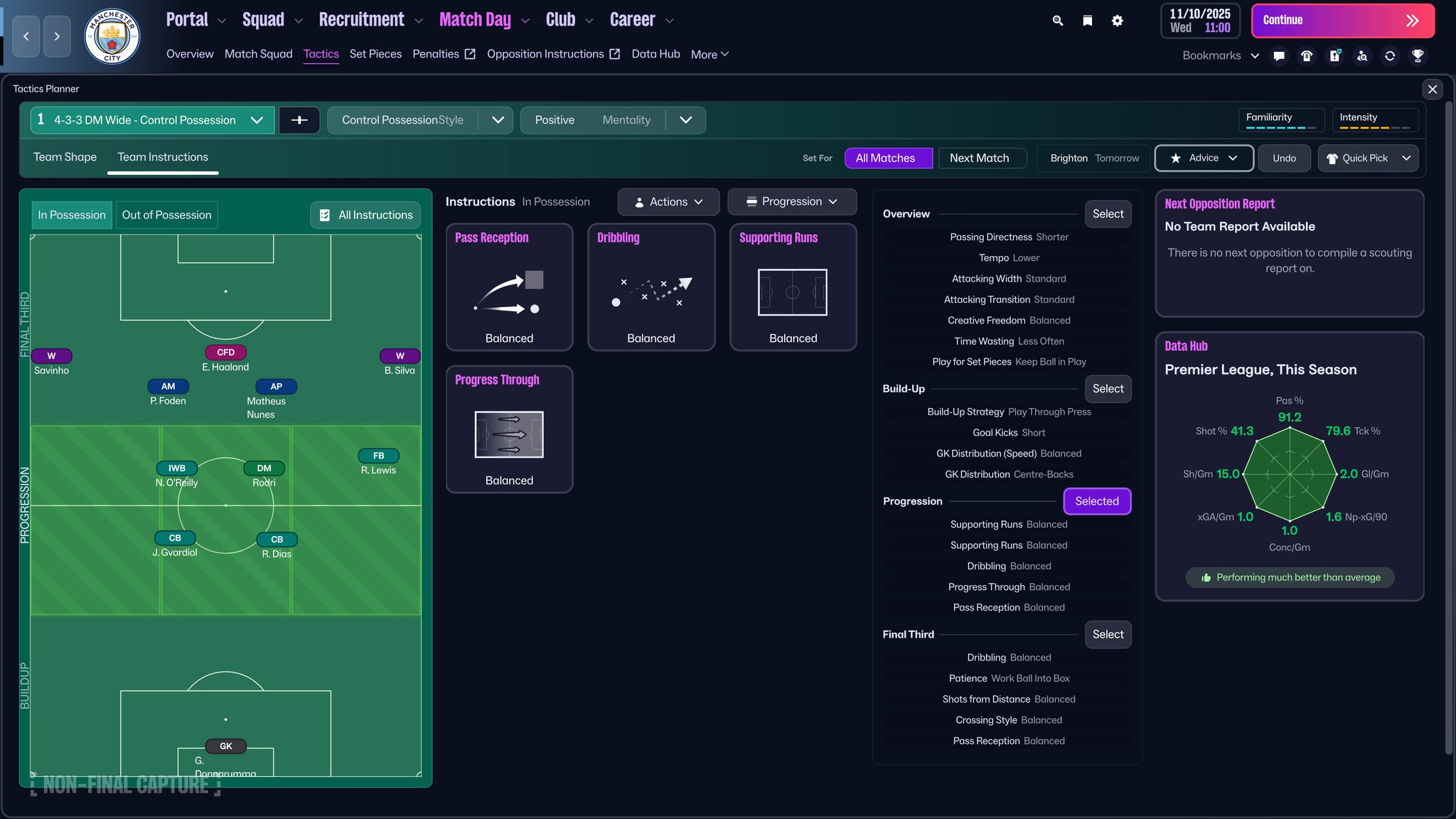
He pointed me to a straightforward example using a traditional 4-3-3 from FM24, the most recent entry at the time. “You can configure it so the roles nudge you into a kind of 3-2-5 attacking shape, similar to what you see with Arsenal or Manchester City. The catch is that you can’t really ask them to defend in a 4-4-2 look at the same time, even though that does happen in real life—such as when Martin Odegaard is defending alongside the striker.”
The developers considered adding more roles to recreate that kind of effect, but ultimately they chose to separate the two systems—an approach that’s become increasingly common for people who understand the modern game. In FM26, new roles have, in fact, been added, but they’re split between when you’re in possession and when you’re out of possession. For example, out of possession, a player set wide on the right might be told to drop back, track opposition attackers even deeper, or hold a wide and high position while waiting for the ‘out ball’ to kick off a counter-attack. Likewise, your CAM—my pick was dear Bruno—can act as a 10 while you have the ball, then shift forward to line up with the center forward defensively as a front two once possession is lost.
There’s also plenty of flexibility in how everything flows. During the preview, I saw some genuinely striking shapes. Technically, you can order your center back to move up into a center forward role while in possession, then retreat back into a center back position after you lose the ball. Still, just because you can do it doesn’t mean it’s wise. Your assistant will give you a small yellow warning that making transitions between such far-apart positions may be difficult if you push it too hard—though you can ignore that advice and stick with your own asymmetrical left back-to-right winger movement if you’re determined.
The team discussed whether to limit that freedom, though. “It was a major call that came early during the design conversations,” Joyce said. “Surely you’d need to put some boundaries in place?” But the team eventually landed on, “yes, they can pull off some wild actions, but [restricting the system] is something I strongly believe we shouldn’t do, because I think FM has always given players that freedom to experiment—and it doesn’t always produce perfect results. It might turn out unconventional. But I think that’s exactly what the tactics system is about.” The warning mechanism was the compromise they settled on.
The visualizer plays a key part here as well—something I hadn’t even noticed at first until Joyce drew attention to it during our interview. Inside the tactics screen, you can now quickly see how your side will look, shown through a visualization similar to a heat map or a passing network: it displays each player’s expected average position across every phase of the match. So if you’re defending deep, you choose the segment of the pitch nearest your goalkeeper and you can then watch the right winger you instructed to stay high, lurking a bit further up. That could leave your right back exposed, but it also may pin the opponent down. This view changes across all three horizontal zones of the pitch, and across all three vertical segments too—so you can examine your setup even when the ball is to the left of the opposition’s penalty area.
That said, the real test is in how the matches actually play out. I soon saw my move from a 4-2-3-1 to a 4-4-2 begin to slip. I couldn’t tell right away whether the issue was simply the switch between those formations, or whether something deeper about our style of play was to blame (the situation wasn’t helped by a warning that Bruno was switching from CAM to ST—a point that left me confused until it was confirmed as a bug). I then moved to Ruben Amorim’s 3-4-2-1, keeping the same structure whether we were in possession or not, and it worked out better. That immediately raises a question I’m keen to explore once the full game is out: how do players with inherently blended roles—like wing backs—behave under this system? A wing back is designed to drop deeper when you’re out of possession and push higher when you have the ball. So does this new approach mean I can leave them set as wing backs in both phases, or do I need to move them into a back five when we don’t have the ball and shift into a front five when we do? For tactical fans like me, it’s genuinely exciting to actually have such tactical puzzles to dig into at this level of detail.
Of course, all this excitement should come with a bit of caution. The one recurring theme that kept showing up alongside the new tactical features was the presence of bugs and other minor annoyances. A lot of these issues feel like
that gets addressed through thorough quality checks, and I tested a build that was around two weeks old when I played it here at the very start of October—so there was still plenty of opportunity to iron out problems before release. Still, the sheer number of small defects was hard to miss, and based on my own experience
More than what a typical team manages to remove from a match within one to two months after it launches.
Some examples include: text overlapping the UI across multiple sections. The typography used for the tactics visualiser didn’t match up with the phases of play I chose. Players’ roles also sometimes failed to stay consistent on different pages of the pop-up while I was trying to tune them for in-possession and out-of-possession situations. On top of that, there are the warning bugs that have already been mentioned, along with the lack of back-button support—among various other issues. And beyond the bugs, there’s something even more important to FM26’s bigger story: several features just don’t work as smoothly as they did before. Emails that require a response no longer stand out in red in the queue, which makes it harder to jump straight to them and deal with whatever needs attention before you can hit Continue again. There’s also no “i” button to move over for a quick look at a player’s attributes—a habit I’ve realized I follow all the time in the current game.
It also feels awkward to swap players and set up your matchday squad, since only small portions of a player’s row in the list are actually usable for dragging. On a player’s individual attributes screen, there’s no way to highlight their key traits for a specific role, and when you click a spot they can fill using the small pitch graphic, there’s no visual explanation of what’s been selected, which roles are available for that position, or what their rating is for each—an approach I’ve unexpectedly depended on more often than I thought when deciding who to bring in, who to move on, and where to use them within my squad in different ways. I ran into all of these problems within just a few hours of play.
So the real question is how much of this can be improved through fixes I haven’t yet uncovered. Bugs can be removed, and UI concerns may come with fresh workarounds and different ways to navigate—meaning you effectively build new habits from scratch. Part of my time with the demo felt like walking around a house where everything has been rearranged: you might end up sitting down on a coffee table by mistake just because it’s in the same spot where your chair used to be. Over time, the updated layout will start to feel normal. But whether it becomes truly instinctive—and how smooth, practical, and comfortable it is—will take a lot more time to judge. For now, start planning those two-phase tactics. This comes across as the kind of game that, at the very least, will reward you for those late nights spent at the training ground. And from Football Manager, I wouldn’t expect anything else.