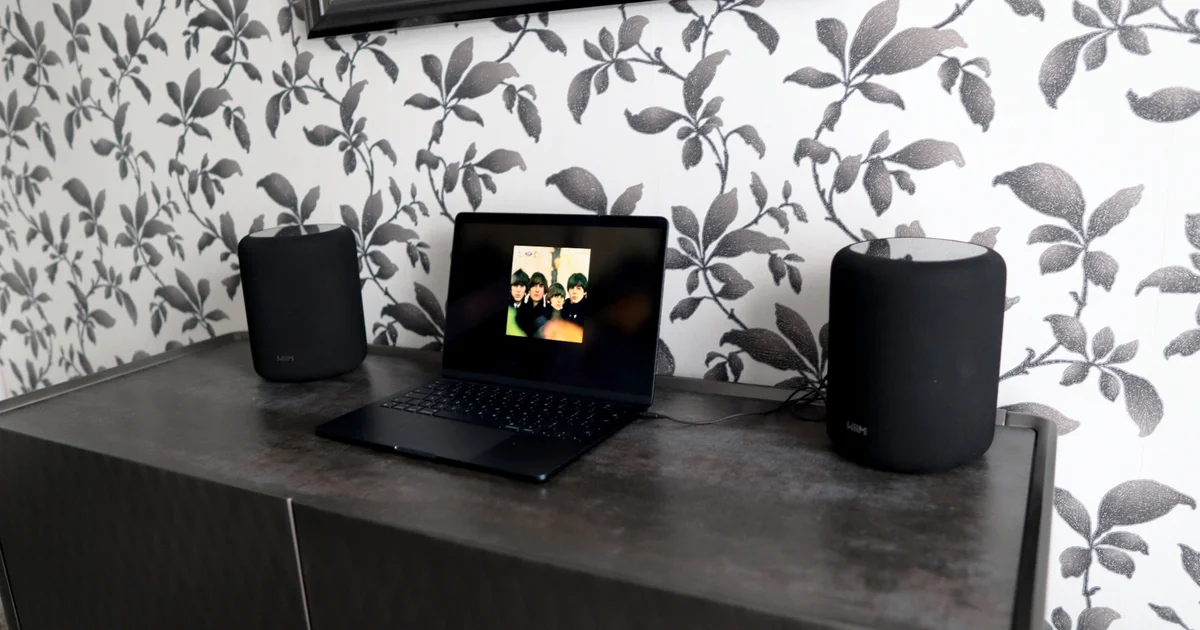
The £229/$229 WiiM Sound Lite may not be the kind of PC speaker you’re used to, but it’s a smart upgrade for setting up a desktop setup for films, gaming, and everyday viewing. It might look like a typical WiFi speaker at first glance, yet it hides one of the most feature-rich audio options I’ve tested for the money.
Used on its own, it acts like a standalone speaker in the same spirit as a Sonos Era 100 or an Apple HomePod (the cylindrical shape and fabric grille certainly bring the HomePod to mind). You get up to 100W of output, plus a 4-inch paper-cone woofer and two 1-inch silk dome tweeters designed to improve overall sound. It’s an attractive, well-built speaker available in black or white, and it’s smaller than you might guess. Compared with the more expensive WiiM Sound, it drops the display and remote control, which cuts £70/$70 from the cost.
Think of it as a refreshed WiFi speaker approach: you can stream music from a wide range of services using the WiiM Home app. In my experience, the app is steady, packed with features, and easy to navigate. Setup took me roughly seven minutes, including a sizable firmware update.
You’ll find plenty of ways to listen, including support for the “Connect” versions of Tidal, Spotify, and Qobuz, along with Google Cast, Alexa Cast, Logitech Media Server, and good old Bluetooth 5.3. For Roon subscribers, it’s also Roon Ready, and you can stream from a network server through the WiiM Home App using DLNA (I’ve been doing this with my QNAP NAS via Plex). One noticeable omission for Apple users is AirPlay 2, which may feel like a step back since competing models include it.

Multi-room support with other WiiM products—including my WiiM Ultra streamer—worked smoothly, letting you build out a larger WiiM audio setup, or a “WiiM-pire,” if you like. You can also take advantage of WiiM’s “Roomfit” room-correction feature, which uses your phone’s microphone to tune the Sound Lite’s audio to your space, in a similar way to Sonos’ TruePlay.
For wired use, there’s a 3.5mm headphone-style jack on the underside, plus an Ethernet port for a steadier wired network connection, along with a figure-eight power connector. To play through the 3.5mm jack, just set line-in as the input so audio from a wired source not handled by the WiiM Home app or Bluetooth 5.3 can play. I ran it as a conventional WiFi speaker in the corner of my living room without any trouble, and it also worked well in a simple desktop setup with my MacBook using the 3.5mm jack—pairing two Sound Lites for stereo. More on that shortly.
The sound it creates feels far larger than the cabinet size would suggest, with impressive stereo width, crisp, high, clear treble, and excellent detail that stays intact. Out of the box, it delivers plenty of bass, which matched my usual mix of rock tracks streamed from Tidal and from my Plex server—though you can dial it in using the wide-ranging EQ controls in the WiiM Home app. If you’re planning a get-together, the Sound Lite can also produce enough volume to fill the room.
I also heard plenty of punch when Fish played “The Rookie,” from the drumming to the rough guitar riffs, with the vocals landing neatly in the center of the mix—almost positioned between the two speakers.
When I moved to James Taylor’s “September Grass,” the Sound Lite came across as confident and full-bodied, with extra weight in the low end. In a stereo pair, it separated instruments and textures cleanly, making small details—like subtle cymbal work or the finer aspects of acoustic guitar—stand out with real clarity.
George Benson’s “Affirmation” is a great way to judge soundstage, and the stereo configuration clearly brings more depth and width than using just one Sound Lite, which is exactly what you’d expect. Even by itself, the Sound Lite’s soundstage stretches beyond what its compact body implies. That said, adding a second unit makes a noticeable difference in how immersive it feels, uncovering plenty of subtle detail and the Sound Lite’s full potential.
Unlike some pricier single-box speaker setups, the Sound Lite doesn’t behave like it’s only tuned for ideal source material. It supports 24-bit/192KHz playback for high-resolution audio, but when you stream standard, lower-bitrate internet radio through the WiiM Home app, it isn’t quite as revealing. Still, it’s easy to create presets for BBC local and national radio stations, whether using the app directly or via TuneIn. You can also locate a network stream for a specific station, save it as a preset, and include its artwork in the app. Some DSP processing is likely happening to optimize radio audio as well as possible, and for relaxed radio listening, the results are surprisingly strong.
Where the Sound Lite really shines—and where it becomes an excellent desktop companion—is when you team it with another unit. In the WiiM Home app, you can set up a stereo pair in minutes for better separation and a more immersive experience. In my tests, the delay between the speakers is minimal, working especially well for music, movies, and even cinematic-style gaming, including titles like Forza Horizon 5 and EA FC 26. For fast competitive games such as Counter Strike 2, though, a headset is still the safer choice.
Once the speakers are grouped in the WiiM Home app, you can assign one as the left channel and the other as the right over a wireless connection. There’s no need to use an audio cable; you just provide power to the second speaker with its own power lead. If you prefer the stability of a wired setup, you can also use an affordable 3.5mm splitter cable to send one output to two inputs. When using the speakers in stereo this way, you’ll need to choose which unit is the “main” speaker that handles everything. For stereo via 3.5mm, connect your laptop or PC to the primary unit—then it will play through both speakers as long as you’ve selected the Aux input in the WiiM Home App.
The stereo pair can also work with Tidal Connect and Spotify Connect inside their respective apps, as long as you route audio to the “host” speaker rather than controlling it straight from the WiiM Home app. For instance, using Chromecast with Plexamp would mean setting up a separate speaker grouping in the Google Home app (since it streams to both speakers at the same time rather than as left and right channels). That can be handled by using the WiiM Home app instead, thanks to its direct Plex integration.
If you decide later to expand the setup with one of WiiM’s subwoofers, or if you want to grow it into a WiiM amp or streamer system with more active speakers, you can put together a capable surround sound configuration without a big hassle. WiiM has also said that the Sound and Sound Lite models should eventually be able to act as rear or center channels in a full surround system, although that capability isn’t available yet.
Even though it’s an unusual pick for a PC speaker, the WiiM Sound Lite stands out as one of the most flexible and capable options in its price bracket—whether you want a single unit, two speakers in stereo, or to fill an entire home with WiiM gear. It looks great, produces a full, powerful sound whether you use it solo or as a stereo pair, and blends naturally into an office, living room, or kitchen. On top of that, it delivers impressive value for the versatility you get.