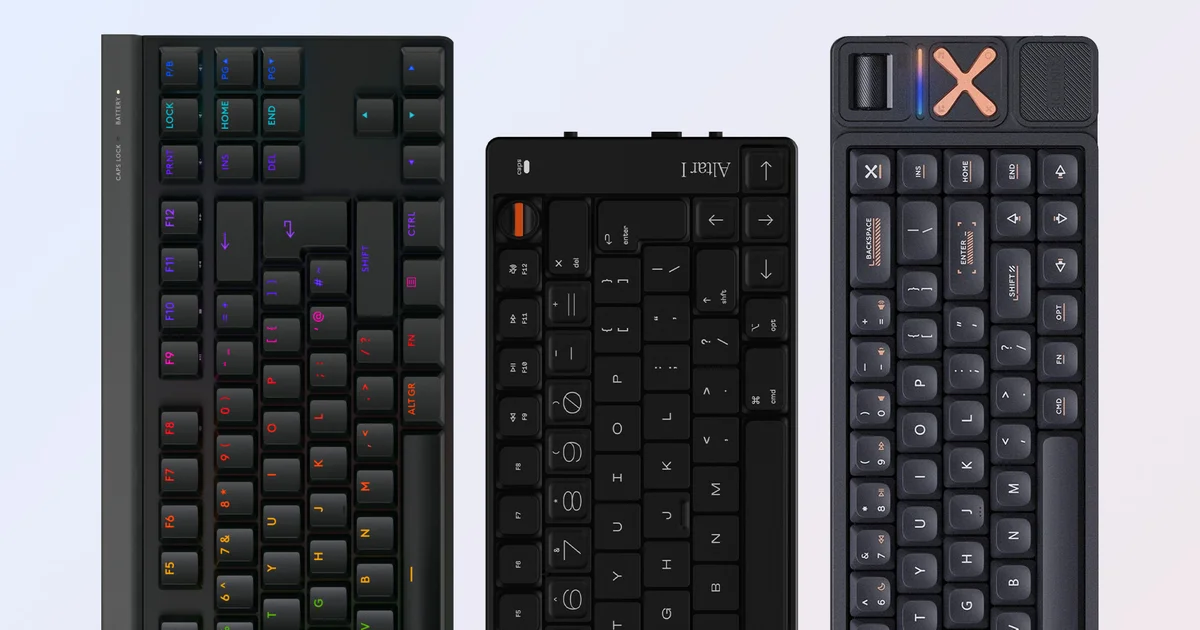
Low-profile mechanical keyboards are a popular pick for people who love the tight, quick feel of a great laptop keyboard, yet want something with more strength, durability, and room for customization. While full-height mechanical models once dominated the mainstream, slimline versions have become far more common lately—and the competition has sparked some genuinely standout designs.
Here, we’re looking at three of these boards: a polished, gaming-focused keyboard from major brand Logitech, a refined option aimed at typists from boutique Chinese maker iQunix, and a quirky, stylish early Apple-style keyboard brought to life by London-based solo venture Electronic Materials Office.
Even though they technically fall under the same broad category, these keyboards are built with very different goals in mind—resulting in some fascinating design differences. Below you’ll find our impressions of the G515 Lightspeed TKL, Magi65 Pro, and Altar 1.
Electronic Materials Office Altar 1 Review

Calling the Altar 1 stylish, retro, or even simply odd wouldn’t really capture it. As Electronic Materials Office’s first keyboard, it also uses low-profile keys that differ in height.
Most of the keys sit low and flat, but the function row and modifiers are raised to add extra height. Meanwhile, the number keys and arrow keys are made shorter. With that layout, it’s easy to tell exactly where you are on the keyboard, aided by clear tabs on the F and J keys that help you line up at the home row. Kailh Choc Low Profile v1 Red linear switches deliver fast actuation, though I personally would have preferred something with a more tactile feel—or even a clicky character—based on my own tastes.
The rest of this 75 percent layout is just as distinctive. Rather than using a horizontal roller or a fairly low-profile volume knob, it includes a longer rotary encoder with a crimson tip in the upper-right area. That red mark is the only real splash of color—and it’s also the one detail that makes the keyboard a little harder to pack away in a backpack. (A reusable recycled cardboard case is included if you want to bring the Altar 1 with you.)
USB-C is supported, but it feels a bit understated: the Caps key flashes continuously while the keyboard is connected, and there are two Bluetooth profiles selectable through a side switch. There are separate pairing and power buttons, yet there’s no way to switch from the default Mac-friendly mappings to Windows conventions. On top of that, there’s no quick mechanism for exchanging the Function and Control keys, which—at least to me—sit in the wrong places (especially since the Fn key lands in the lower-left corner that most people would call “prime real estate”). That said, Apple users may see it differently.
The whole project is clearly built as a nod to classic Mac computers, with familiar fonts appearing across the keyboard and on the equally impressive Electronic Materials Office website. As you’d expect from a company aiming to match Apple’s standards, the build quality is excellent, featuring a Macbook-like aluminum unibody design that stands out whether it’s on a desktop or sitting in a café.
Inside, a microcontroller (reportedly sourced from a sex toy) provides solid performance for both gaming and typing at 1000Hz. My time with Armored Core 6 went smoothly, even after I got used to the new Ctrl key position—fortunately, boosting in AC6 is much less common than crouching with the Ctrl key in FPS games.
What really clicks for me about the Altar 1 is how plainly it’s shaped for a narrow group of users, without pretending it’s a mass-market product. I’d expect features like Windows bindings to eventually arrive, which could broaden its appeal, but for now, it works as a direct reflection of the creator’s determination to build exactly what they imagined.
A fully sold-out pre-order suggests that plenty of people share that same vision, even with the fairly high price tag of £349/$349/€399. Credit where it’s due: EMO didn’t just dream up this keyboard—they actually brought it to life.
iQunix Magi65 Pro Review
The $139 iQunix Magi65 Pro is the first keyboard we’ve reviewed from this Shenzhen-based boutique, and it delivers an eye-catching first impression thanks to its expanded 65 percent layout, copper-toned accents, and aluminum chassis. I’m using the word “expanded” because the Pro version adds an extra right-side section. That includes a textured volume wheel, an RGB light strip, four media controls, and an iQunix logo designed to hide the board’s 2.4GHz USB dongle. For anyone who likes music while working or gaming, those four buttons are a practical touch—set by default to skip forward, skip back, play/pause, and mute.
On the main deck, it’s clear iQunix is keeping pace with the latest keyboard trends. The board uses Kailh-style low-profile 40g hot-swappable switches with cross stems, PBT keycaps with an anti-oil coating, RGB backlighting, multiple layers of sound dampening, and an overall outstanding typing feel.
Bluetooth and USB-C connectivity
…complements the 2.4GHz wireless connection, and a dedicated key combination (together with the keycaps included in the box) makes it easy to switch between Mac and Windows key bindings.
Battery performance is quoted at 300 hours when you use Bluetooth without RGB, whereas day-to-day use with the 2.4GHz connection and RGB switched on should land closer to about 12 hours. You’ll also get a compelling set of extras: a metal keycap, plus a keyswitch puller that, honestly, is the best I’ve used so far. Alongside that are a neat coiled USB-C cable, an assortment of keycaps, a USB-C/USB-A adapter, and a short manual written in clear, excellent English that spells out the key combinations and other key functions.
This is a genuinely appealing keyboard, delivering a truly standout typing experience.
Comparing the Magi65 Pro with the similarly priced Logitech G515 Pro makes it clear that iQunix has produced a surprisingly strong option against more established names. It comes through with a noticeably nicer-looking board, plus a modest edge in both typing feel and built-in features, with the main drawback being software ease-of-use. The Magi65 Pro can be configured through the VIA web application for macros, key remapping, and backlight adjustments, but in my case it required a bit of fine-tuning—specifically a firmware update and loading a draft definition file, in line with iQunix’s instructions.
The Magi65 Pro is an easy recommendation, though you may also want to look at the smaller $119 Magi65. It delivers the same excellent typing feel, but without the volume wheel, media controls, and the space reserved for the USB wireless dongle. Either way, you’re getting a well-made keyboard for a reasonable price.
Logitech G515 Lightspeed TKL Review
Logitech’s G915 and G915 TKL are solid keyboards, but their high pricing and only fairly average typing performance don’t quite match the broader mechanical keyboard scene as of 2024. The new £140/$140 G515 Lightspeed TKL is designed to tackle those issues. It uses a slightly more streamlined design and offers higher-end keycaps at a (modestly) lower price, while keeping the same overall layout and typing character that made the G915 so popular.
The result is a keyboard that performs well across a wide range of use cases. Like its predecessors, the short-travel switches (available in tactile or linear versions) can be triggered quickly and accurately for gaming. The TKL arrangement keeps every key in a familiar configuration, yet gives you a touch more room for your mouse, and the RGB backlighting is bright and applied evenly for comfortable use in darker environments. You also get tri-mode connectivity: Logitech’s 2.4GHz Lightspeed wireless remains the go-to standard for low-latency, gaming-focused wireless, alongside Bluetooth for wider compatibility and wired USB-C charging after your quoted 36 hours of full RGB usage.
The biggest improvement is the keycaps. Logitech has moved from ABS to PBT, which creates a more textured, grippy surface. Switches also arrive pre-lubed straight from the factory, and sound-dampening foam is included to deliver a deeper, more satisfying sound profile. The keycaps use a more typical cross-type stem as well, though it’s unclear whether these changes make a meaningful difference to typing feel—especially when one of the original design’s weaknesses is already being addressed by a growing number of boutique brands that emphasize tactile and acoustic feedback.
When you put the Logitech G515 TKL next to the G915 TKL, the G915 still retains a few perks—most notably an aluminum frame and a volume wheel, both of which are not part of the G515’s listed specs. It’s a shame, since I would have liked to see a side-mounted volume wheel along the lines of the Pro X 60. Still, you can work around the difference using Function keys or by remapping less frequently used keys (for example, Page Up and Page Down) to act as volume controls, depending on what suits you. The good news is that the G515 keeps the solid, confident feel of its predecessor, and I’d personally rather benefit from the G515’s typing upgrades than the G915’s metal build and dedicated volume wheel.
Overall, this represents a meaningful step forward for Logitech in terms of typing quality—something the company has risked losing ground on as smaller competitors focus more heavily on tactile feedback. It’ll be interesting to see whether these improvements show up in other Logitech mechanical keyboards later on, because pairing them with more performance-focused gaming features—such as higher polling rates or faster analog switches—could genuinely deliver the best of both worlds.
Each of these low-profile keyboards stands out in its own way, and it’s been fascinating to see how each manufacturer has targeted specific needs. It’s becoming obvious that typing performance matters just as much as gaming features, and it’s great to see brands like Logitech starting to compete in that space.
Which keyboard has caught your attention the most? Let us know in the comments below, and keep an eye out for more coverage of mechanical keyboards.
Our best 65 percent keyboard guide is scheduled for its next update, and I’m also looking forward to digging into the controversial “simultaneous opposite cardinal directions” or SOCD features introduced by companies such as Wooting and Razer, which allow newcomers to pull off pro-level movement in games like Counter-Strike 2. Exciting times are ahead.