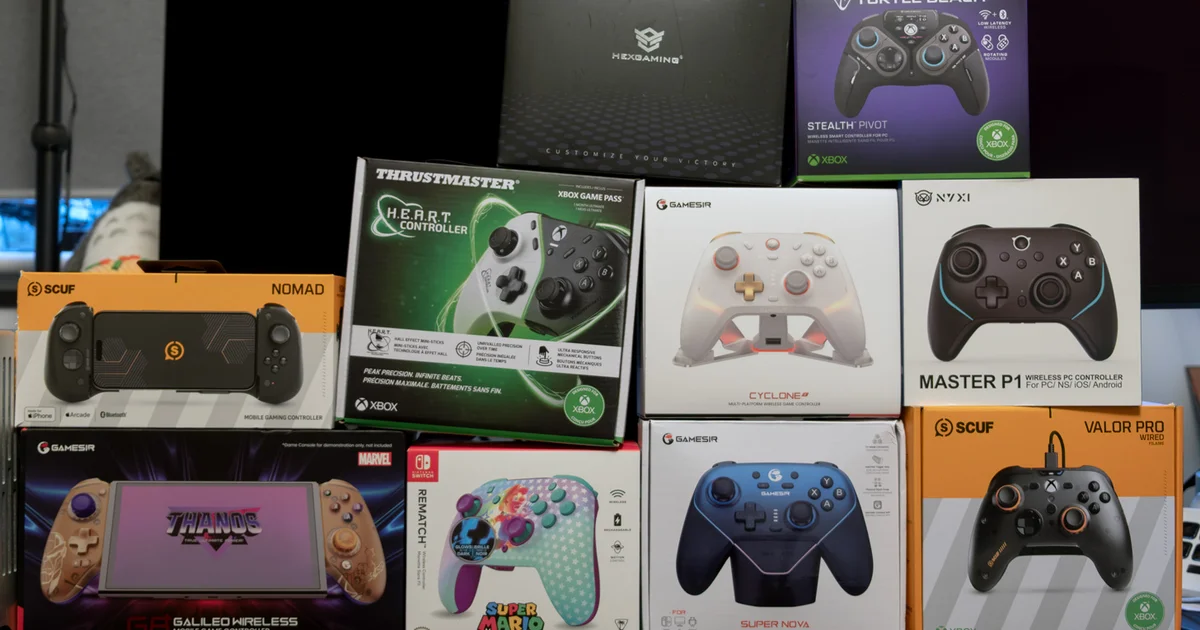
2025 brings the Hall Effect (HE) gamepad, and it looks like almost every new model now applies this advanced technology to its sticks or triggers. The shift is meant to put an end to stick drift, delivering controls that stay more consistent over time. At the same time, this is also a promising year for design experimentation, mixing familiar layouts with unexpected remixes, along with more adventurous color choices.
To show what’s happening in today’s controller scene, we put together reviews for 10 more recent releases. They span well-known names such as Scuf, Thrustmaster, and Turtle Beach, plus newer contenders like GameSir, HexGaming, and Nyxi. Of the 10, eight include Hall Effect sticks, one uses next-gen TMR sticks, and a single low-cost Nintendo option sticks with the traditional potentiometer-style controls.
Most of these are aimed at PC players, but many also work on at least one other platform. That includes a PS5 option, a limited set of Xbox models, and several controllers that support Switch and/or mobile. If you’re wondering whether your next gamepad is part of this mix, take a look—there’s plenty to discover.
HexGaming Phantom Pro Hall Effect Explorer Edition

- In brief: Upgraded PS5 DualSense controller with a transparent shell and extra features
- Specifications: 2.4GHz Wireless, Bluetooth, Wired, PC/Switch/Mobile, 330g, 160x100x60mm
- Purchase: Amazon UK, Amazon US, HexGears Store
The HexGaming Phantom Pro is a solid—though expensive—DualSense upgrade that supports PS5 and PC. It also adds practical options like button remapping, adjustable triggers, and stick replacements. We’ve previously tested boosted DualSense-style controllers from companies including Scuf and MegaModz, and they tend to come with similarly high price tags while offering extra features. Some of those features aren’t commonly available in the PS5 ecosystem beyond Sony’s (generally cheaper) DualSense Edge, which Tom reviewed back in 2023.
For the Explorer Edition we tested, you get a transparent shell that shows the internal hardware, though you can also choose opaque finishes. It’s also worth mentioning that you can buy the unit with either standard potentiometers or the more long-lasting Hall Effect sticks. To me, the extra ~$20 for HE sticks is an obvious choice for anyone already looking at £200/$200+ for a gamepad.
I’m not sure the Phantom truly stands out from the competition when you strip away that heavy customization you get with the Scuf Reflex Pro or the MegaModz DualSense options we mentioned earlier. Still, it does include a useful accessory set: six additional thumb sticks, optional stick protector rings, and a calibration tool. The calibration device attaches under the charging port using a ribbon cable so you can fine-tune each stick. There’s also a quality 10m braided USB-C to USB-A cable for anyone who prefers a wired connection over Bluetooth.
Beyond that, the controller follows familiar patterns. The adjustable triggers lock down firmly for quick digital-style inputs, the four back buttons are placed with care where your middle fingers naturally rest, and they deliver a satisfying click. Switching between profiles and remapping controls on the fly is straightforward—handy for titles that don’t provide suitable controller presets, or don’t offer them at all.
Where the Phantom Pro loses ground is the overall feel in daily use. The top three action buttons (Square, Triangle, Circle) felt good, if a bit on the light side, but the X button had almost no meaningful travel when pressed. All four buttons registered properly, yet the difference in sensation was distracting. (I’m hoping this was limited to our specific unit, since other reviews haven’t raised the same concern.) Outside of those buttons, the rest of the controller doesn’t meaningfully improve on what you’d expect from a standard DualSense, even though it still worked reliably. As always, standard PC setup considerations apply: some games run smoothly, while others require third-party tools such as DSX and DS4Windows.
In the end, I’d still point to the Scuf Reflex Pro and the Sony DualSense Edge as stronger value picks. However, the Phantom Pro makes a convincing case for durability, largely due to those HE sticks and the included calibration tool.
GameSir Super Nova
- In summary: A cost-friendly Hall Effect controller for PC and mobile, paired with a docking station
- Specifications: 2.4GHz Wireless, Bluetooth, Wired, PC/Switch/Mobile, 263g, 156x106x59mm
- Purchase: Amazon UK, Amazon US
The GameSir Super Nova is surprisingly simple to recommend for PC and mobile gaming. It lands in the same price range as an Xbox Series controller, yet it delivers noticeable upgrades: Hall Effect sticks and triggers, two programmable back buttons, a hair trigger option, and support for three connection methods up to 1000Hz (via wired or 2.4GHz wireless). Battery performance is only average—about 15 hours—but the one real downside is largely solved by the included magnetic charging dock.
It also includes some genuinely nice aesthetic touches. There’s optional RGB lighting that syncs across both the dock and the controller, plus magnetic face plates that let you personalize the Super Nova’s look. The Nightfall Blue colorway we received stands out: a glossy gradient shifting from lighter to deeper blues, along with rubberized grips along the lower edges that feel comfortable—though they’re not the most grippy I’ve tested.
In terms of performance, the Super Nova did well in Forza Motorsport on PC and Fire Emblem Engage on Switch. Android and iOS are also supported. The membrane face buttons delivered dependable responses with very little noise, and the Hall Effect sticks felt quick and responsive. Haptic feedback also proved useful, making it easier to sense how the car’s grip changes while you’re driving in Forza. The rear paddle-style buttons were easy to get to as well. With the GameSir Connect app on PC (and Android/iOS companion apps available), remapping and tweaking settings was straightforward, with plenty of options across different parameters. There’s even a way to swap the face buttons to match the Nintendo layout, which is a thoughtful addition.
At its £50/$50 asking price – at the time
in terms of value, the Super Nova stands out as an exceptional buy and I’d strongly recommend it for gamers who mainly play on PC, Switch, and/or mobile. It delivers dependable performance.
It also includes every feature I look for in a top-quality third-party PC controller in 2025.
GameSir Cyclone 2
- In brief: An early look at TMR sticks with noticeably clickier buttons
- Specifications: 2.4GHz Wireless, Bluetooth, Wired, PC/Switch/Mobile, 228g, 156x103x63mm
- Purchase: Amazon UK, Amazon US
Magnetic Hall Effect sticks are now firmly established, but the next step is already arriving: TMR, or “tunnel magnetoresistance” sticks. These sticks are said to improve precision and power efficiency over Hall Effect designs, while still keeping the same durability edge versus traditional potentiometer-based alternatives. The first TMR model I’ve tested is the GameSir Cyclone 2, and it delivers an encouraging first impression of the technology.
The Cyclone 2 costs just £5/$5 more than the Super Nova mentioned earlier. Aside from the TMR sticks, it brings many of the same strengths: a bundled magnetic charging dock, Hall Effect triggers, programmable rear buttons, RGB lighting, and a 1000Hz polling rate through 2.4GHz wireless. Like the Super Nova, it works with PC, Switch, iOS, and Android. That said, there’s no sign of magnetic face plates here—only an RGB glow visible through the semi-translucent shell.
Overall, the TMR sticks tend to feel a bit more substantial, closer to traditional potentiometer sticks, and I couldn’t spot any meaningful change in accuracy when compared with Hall Effect options. Given their theoretical durability benefits—namely a lower chance of stick drift developing over time—these sensors could be worth adopting sooner rather than later. (Of course, real-world results still depend heavily on implementation, and TMR is still a relatively newer technology overall.) I also enjoyed the Cyclone 2’s clickier d-pad and face buttons more than the calmer, quieter feel of the Super Nova.
If you want to jump into the TMR trend, the Cyclone 2 looks like a dependable choice. It keeps many of the same benefits and features as the Super Nova, including the GameSir Connect software that brings a lot of power to configuration.
Scuf Valor Pro
- In brief: An esports-focused wired controller for Xbox and PC
- Specifications: Wired, Xbox/PC, 260g, 153x107x64mm
- Purchase: Amazon UK, Amazon US
The Scuf Valor Pro is a great option if you want premium features from a well-known brand, but you’d rather spend less by choosing a wired controller instead of going wireless. The Valor Pro remains a high-end Xbox and PC controller, built with quality components, Hall Effect sticks (a first for Scuf), optional hair triggers, and four customizable rear paddles—so performance is very much front and center.
The Valor Pro largely sticks to a familiar design, using a classic Xbox-style layout that’s a little smaller than the Elite Series 2. Still, there are a few extras you’ll notice right away: a semi-transparent magnetic face plate for visual customization, scroll wheels near the audio jack for quick volume and mix control, and a soft-touch casing that feels comfortable in your hands from the moment you pick it up.
In matches, the Scuf Valor Pro is the best controller I’ve used for Call of Duty. The rear paddles are placed perfectly and are easy to tell apart by touch—one set is clicky, while the other feels softer. (If you prefer, you can also turn off the clicky inner pair using blanking plates.) The thumb sticks perform well, with a firmer centering feel than a typical Hall Effect stick, and the box includes two alternate thumb sticks so you can experiment. The clicky hair triggers support quicker inputs, along with satisfying tactile and audible feedback. The wraparound bumpers took a little getting used to, but they can reduce finger movement depending on grip style, which I appreciated.
The only problem I ran into was enabling the 1000Hz polling rate on PC. The process is a bit awkward because the Valor Pro doesn’t tie into Corsair’s iCUE software the way the Scuf Envision does. Even though this is an Xbox-oriented product, it still surprised me, since I usually find button remapping and other tweaks much easier with a dedicated software app. The “Valor Updater” tool is also somewhat inconsistent, often requiring multiple tries to complete an update. Most importantly, two separate .exe files have to be run back-to-back to update the firmware, and both require admin mode on Windows 11. For tasks like remapping the rear paddles, you’ll need to consult the manual until you’ve committed the necessary button sequences to memory.
Using a mouse and keyboard still feels more natural to me, but I get the impression that my skill ceiling is a touch higher with the Valor Pro than with most controllers on this list. Of course, you can use the extra buttons and responsive setup in other genres too—I also had fun driving a Lexus RC F around Watkins Glen in Forza Motorsport. In the end, it’s absolutely worth considering if you prefer Xbox, or if you’re searching for an excellent wired PC controller.
Thrustmaster Heart Controller
- In brief: A wired Xbox-focused controller alternative, plus genuinely useful companion software
- Specifications: Wired, Xbox/PC, 214g, 160x110x45mm
- Purchase: Amazon UK, Amazon US
The Thrustmaster Heart Controller comes with an odd-sounding name, but the French company is essentially telling you that this gamepad uses Hall Effect sticks meant to help prevent drift. While that may not fully justify the prominent Fallout-style “H.E.A.R.T.” branding on the left side of the controller, if it results in a reliable controller, then it works. What really sets the Heart apart are its mechanical face buttons and d-pad, including a short 0.3mm travel distance, plus two remappable buttons mounted on the back of the wired-only gamepad.
There’s also a strangely vivid asymmetric RGB strip that visually separates the
Move the Heart’s illumination into white and black sections, letting you dim each one and alternate between six lighting colors by pressing the profile button and using the d-pad. Oddly enough, you can’t change the lighting through the ThrustMapperX software, yet you can fine-tune stick sensitivity, set dead zones, remap buttons, and install firmware updates. Coming from the disappointment of the limited software support on the Scuf Valor Pro, this felt like a welcome upgrade. You can also remap the rear…
buttons directly on the controller itself if you don’t have access to a PC.
After putting the Heart through my usual mix of RPGs, racing games, and FPS titles, I’m left feeling a bit torn. In racing, it worked well for me—comfortable to hold, and a good match for its roughly £100 RRP. In RPGs, though, the d-pad’s restricted range of motion became a constant annoyance, because it was far too easy to highlight the wrong option while browsing an inventory screen or selecting attack targets. (The Start/Select buttons are also fairly small, so hitting them reliably can be tricky.) I ran into a comparable problem in FPS games, but in that scenario you’ll likely be using the d-pad less frequently.
With all that said, I’d still encourage you to try the Heart if you’re after an Xbox and PC controller that’s simple to reconfigure using software. I’m confident I could get used to the d-pad layout and the start/select placement, since the rest of the controller feels thoughtfully designed and sturdily built.
Turtle Beach Stealth Pivot
- In brief: A standout rotating wireless controller that includes two built-in button layouts
- Specifications: 2.4GHz wireless, Bluetooth, Wired, Xbox/PC/Switch/Mobile, 301g, 161x108x67mm
- Purchase: Amazon UK, Amazon US
“Ready to pivot” is one of the phrases Rich enjoys using in our Patreon updates to signal that we’re willing to reshape our plans to cover what’s happening right now. So Turtle Beach’s Stealth Pivot already had me smiling before I even opened the box. My amusement grew when I saw that the default arrangement of sticks, d-pad, and face buttons can rotate into a fighting-game style layout—moving the d-pad and two face buttons to the left, while revealing six extra face buttons on the right.
The rotation itself is wonderfully fluid, taking only a second or two, though you do have to rotate each thumbstick as well—lowering their height to allow the movement. Each side also includes locking mechanisms underneath the controller, which helps prevent any accidental rotation during play. It’s an unexpectedly sensible feature for fighting game fans, and as a controller-based party trick, it’s hard to top.
Beyond that, the Stealth Pivot looks like the Stealth Ultra, with a built-in one-inch LCD screen near the top. That display makes it easier to tweak control and settings, and you also get optional hair triggers, Hall Effect sticks, two programmable rear buttons, a configurable volume dial, a 3.5mm jack, and support for PC and mobile (2.4GHz, Bluetooth, or wired) plus Xbox (wired only). There’s also a full software package for Windows, Xbox, and mobile (Turtle Beach Control Center 2) if you’d rather configure everything that way.
The controller feels solid in the hand and doesn’t strike me as overly bulky, despite the rotating button design, though it is still one of the heavier options on this list. In actual gameplay it holds up nicely too: the membrane face buttons feel acceptably responsive, the sticks are accurate, and the layout is comfortable, even if the rumble isn’t as impressive as it could be. In Soul Calibur 6, the fight-stick mode outperformed my expectations, delivering a great d-pad and far more approachable left/right shoulder buttons, along with programmable P1/P2 buttons.
All in all, it’s an excellent pick for fighting game players who want one premium controller that can work across a range of genres.
Nyxi Master P1
- In brief: An affordable wireless controller featuring Hall Effect technology
- Specifications: 2.4GHz wireless, Bluetooth, Wired, PC/Switch/Mobile, 230g, 152x106x62mm
- Purchase: Amazon UK, Amazon US
The Nyxi Master P1 lands in a similar space to the GameSir Super Nova. It sticks with an Xbox-style layout, includes Hall Effect sticks and triggers, offers optional clicky hair triggers, a clicky d-pad, and gives you two rear buttons that can be locked and programmed. Even though it’s made from plastic, it feels firm and reliable when you hold it, but compared with the Super Nova there’s a slight dip in finish—button legends feel less polished, and the look is a straightforward monochrome design without swappable face plates. You do get a strip of RGB lighting that separates the (perfectly fine) grips from the rest of the (smooth) body, which brings to mind the Razer Wolverine V2 Chroma.
When I tested the P1 over Bluetooth on a Mac, it reported itself as an “Xbox One S” device. It’s a little amusing, but it’s likely helpful for compatibility. Core functions worked flawlessly straight out of the box, although the included media controls didn’t function in macOS.
The controls feel very familiar overall. The start/select buttons sit in a more sensible position than on some competing models, the membrane face buttons feel solid enough, and the rear buttons match up well with where I naturally rest my middle fingers. While I spent time moving through a few homebrew games, the clicky d-pad felt less distracting than it did on the Thrustmaster Heart. Still, the eight-way structure on a similarly priced standard Xbox controller appears a touch more sturdy. The hair trigger mode also demands a bit more movement than what you typically get on other controllers, which isn’t ideal for FPS titles. As for rumble, this one comes across as the least effective among the controllers on this list that include it.
Of course, the appeal here is the more dependable Hall Effect sticks and triggers, which should last longer than standard potentiometer-based alternatives—including those supplied with the PS5 and Xbox Series X/S. Even so, I’d still steer you toward the GameSir Super Nova or Cyclone 2 instead, because they deliver a more precise feel, include a magnetic charging dock, and cover the same platforms at a similar price point. That said, if the P1 is noticeably cheaper in your region, it could be a sensible option.
Turtle Beach Rematch Wireless
- In brief: An affordable wireless alternative to Nintendo’s Pro Controller
- Specifications: Bluetooth, Switch, 301g, 165x127x51mm
- Purchase: Amazon UK, Amazon US
The Rematch Wireless is an engaging Switch controller with glow-in-the-dark Mario artwork, and it costs less than Nintendo’s…
Pro Controller, plus a handful of genuinely “pro” touches, thanks to two back buttons you can remap. The device works only with Switch—plugging it into a PC merely charges it. That restriction feels a bit arbitrary, but given the playful, kid-friendly style, it probably won’t be a deal-breaker for most.
On Switch, I had a great time tackling multiple stages of Horizon Chase Turbo, getting stuck early in Doom 2, and earning the expected opening bot match in Fortnite. The (potentiometer-based!) analog sticks seem a touch light, but the membrane face buttons provide a satisfying tactile response, the d-pad performs reliably, and the (digital, because Switch) triggers are short-throw and quick to react.
In general, the build and overall design give off a sense of polish that gets pretty close to the Pro controller—despite being made entirely from plastic. With the lower asking price, eye-catching graphics, and extra buttons, it’s an easy compromise to accept.
GameSir G8 Plus (Thanos Edition)
- In summary: A sturdy backbone-style controller for Switch or mobile
- Specifications: Bluetooth, Switch/Mobile/PC, 314g, 262x149x66mm
- Purchase: Amazon UK, Amazon US
The GameSir G8 Plus, shown here in the gold-toned Thanos Edition, is a backbone-style controller that extends to accommodate your Switch, mobile phone, or tablet—up to 215mm in length. It also supports PC over Bluetooth or an optional 2.4GHz adapter (sold separately), though the layout doesn’t quite feel as natural on PC.
As you’d expect from a modern GameSir model, it’s exceptionally well made, with responsive Hall Effect sticks and triggers, no noticeable deck flex, and a comfortable full-size Xbox-like layout. The Thanos Edition looks genuinely striking, with Infinity Stone colored face buttons and gold/purple accents throughout, and you also get the villain’s face and the signature snap-on grips. On the rear, you’ll find two more buttons placed conveniently for your middle fingers. The biggest drawback is battery life: it’s rated for eight hours, which falls short of more standard controller designs.
I spent a fair amount of time with Supergiant Games’ classic Bastion, where timing and accuracy matter for dodging incoming projectiles and landing attacks at exactly the right moment. The G8 Plus stayed comfortable the whole way through. You can also use a companion mobile app to remap controls, which helped me match the Switch button prompts to Xbox-style labeling. Alternatively, you could remove the magnetic top cover and rearrange the face buttons into a Nintendo-style setup. Turbo mode and replacement joysticks are included, too.
If you mostly play on the move using Switch or a mobile device, this is a strong value pick that also looks fantastic in this limited edition. The only real concern is battery life, so long as you can top up via USB-C without hassle, this remains an excellent option—and the best backbone-style controller I’ve tested.
Scuf Nomad
- In summary: A compact iOS-only backbone-style controller
- Specifications: Bluetooth, Mobile, 228g, 202x101x51mm
- Purchase: Amazon UK, Amazon US
The Scuf Nomad is a neat, almost pocket-sized backbone-style controller made exclusively for iPhone and iPad—there’s no Android or Switch support here.
Once paired, it works smoothly, guiding you to install Scuf’s dedicated software so you can access a wide settings menu and a (slightly outdated) catalogue of suggested games that support controllers across the App Store, Apple Arcade, and different streaming services. Galaxy on Fire 2 HD dates back 13 years, so it won’t be optimized for the notch display on modern iPhones, but its arcade-style space combat still feels at home on the Nomad. Newer releases like Diablo Immortal and Honkai: Star Rail bring better integration and more involved setups that really help you take advantage of the high-quality membrane buttons, Hall Effect sticks, and programmable rear paddles.
I did find that my phone occasionally shifted out of the Nomad—both with and without a case—and on one occasion my finger struck the mechanism. Still, the overall design makes sense. The soft-touch finish feels good in the hand and offers solid grip; setup and charging are simple, and there are extra buttons for opening the Nomad app or returning to the home screen.
Overall, it’s a polished experience tailored to iPhone users, delivering a noticeable upgrade in day-to-day play compared with touch controls. While it should also work with Android, having more up-to-date game suggestions in the app would make the experience even better.
Conclusion
It’s been interesting to test so many gamepads over a fairly short two-week period. It’s clear that certain features are quickly becoming the norm—like Hall Effect sticks and triggers—but there’s still plenty of experimentation in other areas, too. Different companies make different calls about features, design choices, colors, and materials, and the quality you can find today for £50 or £100 can even leave some first-party options trailing.
What’s your take on this roundup? Which, if any, of these controllers caught your attention? Share your thoughts in the poll and comments below. And if you want more controller coverage, be sure to check out our rankings of the best PC gamepads for 2025 as well.